How to Find Open Source Projects That Actually Welcome Contributions
Stuck thinking how to start open source contributions? Learn how I find and approach existing open source projects that accepts my pull requests.
On this page
Since you came across this post, I believe you are either trying to learn more about open source or finding a legitimate way to approach new open source projects to contribute to.
If so, you’re in the right place!
Hi, I am Shivam and I will tell you about my experiences in open source contribution and how I planned and got my first pull request merged. Along with this, I will also tell you some common approaches that works really well in the open source contribution life cycle.
If you have ever set out to make your first open source contribution, you have probably experienced this exact cycle of frustration:
- You search GitHub for issues tagged
good-first-issue. - You click on an intriguing issue, only to scroll down and see 12 different people commenting: “Please assign this to me!”
- You find another issue that looks unclaimed, spend hours writing a fix, open a Pull Request, and… silence. Weeks pass by, and nobody ever reviews it.
- You check the repository’s commit history, only to realize the maintainer hasn’t committed any code since 2023.
It’s easy to feel discouraged and think that open source is overcrowded or unapproachable. But the problem isn’t your coding ability, it’s how you’re choosing repositories and what resonates with you.
Creating a great open source contribution isn’t just about finding an issue; it is about finding a healthy, active, and welcoming codebase.
Here is the exact checklist that you can use to find the repositories where your contributions are genuinely needed and appreciated.
1. The “User-First” Strategy (Your Highest Success Rate)
This is the exact strategy that worked out for me, as my very first open source contribution.
Initially I made a mistake by treating the GitHub like a random job board. Browsing unfamiliar tools and projects to find an easy typo or one line bug fix.
This is like mindless scrolling through your Instagram, and it won’t help you find a good repository to contribute to.
Instead, flip the formula: look at your own dependency tree.
Think about the tools you use every single week:
- CLI tools you run in your terminal (like Git helpers, dataset downloaders, or build tools).
- Astro integrations, React UI libraries, or Tailwind plugins powering your personal projects.
- Python packages you import in your Jupyter notebooks or data pipelines.
This is exactly how I made my contribution to kaggle-cli. I was actively using the tool for Kaggle competitions, ran into confusing error messages when submitting code, and tracked down the issue in the codebase. Because I was an actual user of the tool:
- I already understood the expected behavior and edge cases.
- I had the environment installed and configured.
- I could write realistic regression tests because I knew what inputs broke the workflow.
When you contribute to tools you already use, your PR is inherently 10x higher quality because you are solving a problem that real users actually face.
Takeaway: Open your project’s
package.json,requirements.txt, or your terminal history. Pick 3 tools or libraries you use frequently and check their GitHub repositories first.
I have already posted a blog explaining my first open source contribution journey. If you are completely new to open source, you will definitely get to know new things.
2. The 2-Minute Repository Health Checklist
Before you write a single line of code or ask to work on an issue, run this quick 2-minute diagnostic on the repository. If it fails more than one of these checks, walk away and find another project.
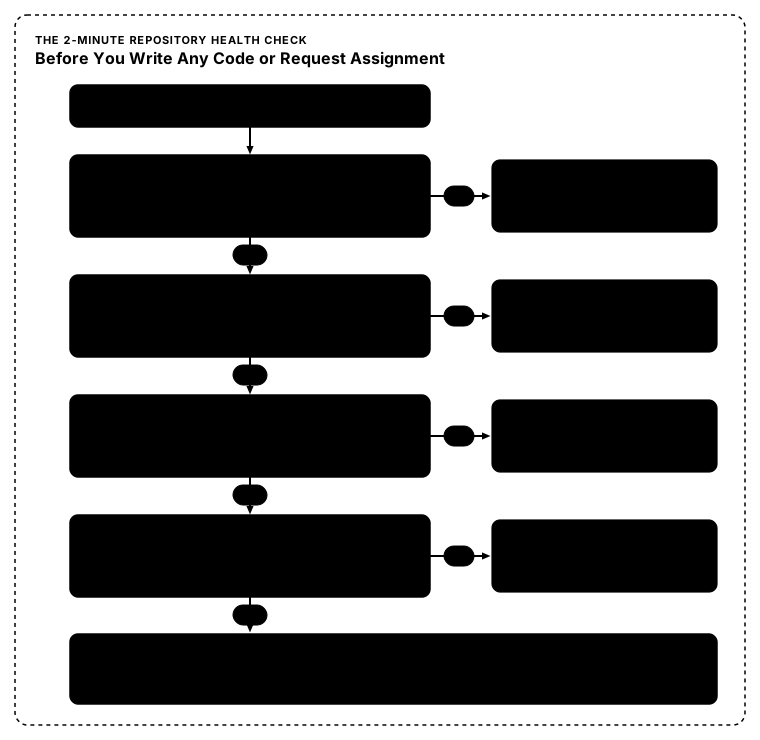
Check 1: Commit and Release Velocity
- Look at the top of the repo’s homepage: When was the last commit to
main? - Check the Releases tab: Have they published a release within the last 3-6 months?
- Red flag: If the last commit was 8 months ago, the maintainers are likely on hiatus or the project is abandoned. Your PR will sit unreviewed.
Check 2: Closed PRs vs. Abandoned PRs
- Click the Pull Requests tab and filter by
is:pr is:closed. - Are PRs from external contributors regularly merged? Or are they closed abruptly without explanation?
- Switch to
is:pr is:open. Are open PRs receiving feedback from maintainers within a week, or are there pages of open PRs from 2024 with zero comments? - Healthy sign: Maintainers actively leave constructive feedback, request tweaks, and hit the “Merge” button.
Check 3: Maintainer Demeanor in Discussions
- Open 2 or 3 recent closed issues. How do the maintainers communicate?
- Do they guide newcomers with polite suggestions like “Thanks for spotting this! Could you also add a test case in
tests/test_api.py?” - Or are they curt, condescending, or completely unresponsive? You want to work with teams that value collaboration.
Check 4: Automated CI/CD and Test Suites
- Does the repository have automated checks (like GitHub Actions, pre-commit hooks, or test runners) on PRs?
- Why this matters: A repository with a green, working test suite gives you an instant safety net. You can run
pytestornpm testlocally to verify that your changes didn’t break anything. Repositories with broken CI suites make PR verification a nightmare for both you and the maintainer. - This is the standard in industry to use automated CI/CD pipelines to verify the build before publishing to production.
Check 5: A Real CONTRIBUTING.md
- Legitimate, welcoming projects almost always have a
CONTRIBUTING.mdfile. - It should explain:
- How to set up your local development environment.
- How to run tests.
- Their branching and commit message conventions.
- If everything passes, you should read this document carefully and understand the projects rules for contribution.
Yes, you can us AI code agents to understand and even write the codebase.
But make sure you understand what the generated code does because the coding agent only generates the code, the real accountability falls over you.
3. Smarter GitHub Search Queries (Beyond #good-first-issue)
At first, you might not have any specific tool in mind and you want to discover active projects. If you go through the explore tab, you will get in a crowd of thousands of developers.
Instead, use advanced search filters directly in GitHub’s search bar to target active, unassigned issues in your favorite language.
Filter by Active Activity & Unassigned Status
Paste this query into GitHub’s issue search:
is:issue is:open label:"good first issue" no:assignee pushed:>2026-09-01 language:pythonWhy this query works:
is:issue is:open: Filters out closed discussions.label:"good first issue": Targets beginner-tailored tasks.no:assignee: Filters out issues that someone else is already working on.pushed:>2026-09-01: Ensures the repository had code pushed recently (adjust this date to the last 30–60 days).language:python: Scopes to the language you are comfortable writing in (swap withtypescript,rust,go, etc.).
Look for Alternative Issue Labels
Many maintainers avoid the label good first issue during October to protect their repos from automated spam. Instead, try searching for:
label:"help wanted"label:"documentation"label:"needs reproduction"label:"low hanging fruit"
There are many other labels but these are the generic ones. Maintainers can create any kind of labels as they see fit to the scope of the issue.
4. How to Claim an Issue Without Being Ignored
This is a point that creates rapport and trust between you as a contributor and the maintainer of the repository.
We have all seen issue threads cluttered with comments like:
“Can I do this? Assign to me please.” “Sir, assign me.”
Maintainers see dozens of these generic comments every day. These comments doesn not tell the maintainer whether this person really understand this issue or just want to get assigned.
If you want maintainers to eagerly assign an issue to you, show your thought process upfront:
The High-Probability Comment Formula:
- Confirm that you can reproduce or understand the issue.
- Outline your proposed approach in 1 or 2 sentences.
- Ask if they are open to a PR following that approach.
Example:
*“Hi @maintainer! I looked into this and was able to reproduce the error locally. It looks like
validate_input()insrc/utils.pydoesn’t handle null values when flag--forceis passed.My plan is to add a check for null inputs and include a unit test in
tests/test_utils.pycovering this edge case. If this approach looks good to you, I’d love to work on this and submit a PR!“*
When a maintainer reads that comment, they immediately know three things:
- You actually read the code.
- You understand where the fix belongs.
- You won’t create extra cleanup work for them.
Ninety-nine percent of maintainers will enthusiastically say yes.
5. Non-Code Ways to Build Credibility First
If you find a project you love but all existing issues are too complex, you do not need to get away or try to find bugs in the code. You can build trust with maintainers through high-value entry points:
- Clarifying Documentation That Tripped You Up:
Don’t just fix typos. When you set up the project locally, did a command fail? Was an environment variable missing from
.env.example? Was an installation step out of date? Updating the onboarding guide is one of the highest-value PRs for a maintainer. - Reproducing and Verifying Stale Bug Reports: Go to the open issues list and test someone’s bug report on the latest version. Leave a comment: “I tested this on version 2.4.1 on Ubuntu 24.04 and could not reproduce it with the following steps…” Maintainers appreciate issue triage almost as much as code.
- Adding Missing Test Cases: Find a function that lacks edge case tests and submit a PR adding test coverage. Maintainers almost never turn down well-written tests.
Looking for a Welcoming Repo to Start With? (Contribute to PhyTracker!)
If you want to put this framework into practice right now and are looking for an active, beginner-friendly project, you are more than welcome to contribute to PhyTracker.
PhyTracker is a local-first, privacy-focused cross-platform productivity tracker built with Tauri, React, TypeScript, and Rust, featuring on-device AI categorization.
Whether you want to:
- Polish modern React & TypeScript UI components,
- Explore desktop systems programming in Rust with Tauri,
- Benchmark client-side embedding models and classification heuristics, or
- Clarify documentation, setup guides, and write unit tests,
…all contributions are welcome! Feel free to explore the open issues or propose a fix/feature using the approach outlined above. I personally review PRs and will make sure you get constructive, friendly feedback on your code.
The Quality Over Quantity Mindset
Open source isn’t a race to collect meaningless green checkmarks or spam 4 trivial pull requests for a t-shirt.
When you pick a repository with responsive maintainers, clean code practices, and an active community, every PR becomes an opportunity to get free code reviews from senior engineers around the world.
Start small, pick projects you genuinely care about, verify the repo’s health before typing code, and propose clear solutions. Once you establish that momentum, contributing to open source stops being intimidating, and becomes one of the best ways to grow as a software developer.
Enjoyed this article?
Tap the clap button to show your appreciation!
Questions, thoughts, or ideas? Share below — no account required.
No comments yet
Have a question or feedback? Be the first to start the discussion!
Delete comment?
Are you sure you want to delete this comment? Its content will be permanently removed.